Claude Dispatch dropped on March 17. OpenClaw has been the undisputed king of self-hosted agent runtimes since day one. Perplexity Computer is the shiny $200/month cloud worker everyone’s talking about. And somewhere in the middle, a community tool called Telecodex is quietly doing things OpenAI never officially shipped. This is the comparison nobody has written yet.
Let’s be honest: the AI agent space has been dominated by a lot of vaporware, half-baked demos, and communities arguing on X about which tool is “truly agentic.” But in the last 90 days, the game changed. Real products shipped. Real rivalries emerged.
OpenClaw started this whole drama. It was the first self-hosted agent control plane that actually worked, not just a wrapper around an LLM, but a real always on agent runtime with cron jobs, heartbeats, webhooks, multi-channel delivery, and a proper gateway architecture. It proved that “persistent AI agents” wasn’t just a research concept. It was something you could run on a $5 VPS and talk to from Telegram at 2am.
And then….
Perplexity launched Computer on February 25, 2026 a managed cloud alternative aimed squarely at the “I want an AI that does work for me while I sleep” crowd. On March 17, Anthropic fired back with Claude Dispatch, a cross-device remote control system built directly into Claude’s Cowork environment. And on the coding side, while OpenAI hasn’t shipped an official channel adapter for Codex, the community built Telecodex a Telegram native bridge that does what OpenAI hasn’t bothered to do yet.
Four very different visions of what an “AI agent runtime” should actually be….
Here’s the full breakdown.
A Brief History: How OpenClaw Started This Whole Thing
Before we compare tools, we need to credit the thing that made this category real… OpenClaw wasn’t just first, it was architecturally first. It introduced the idea of a Gateway: a persistent, always-on daemon that manages sessions, channels, routing, memory, and automation in one place. It treated your AI agent less like a chatbot and more like a background process that could be poked by Telegram, Slack, Discord, email, webhooks, or a cron job at 6am.
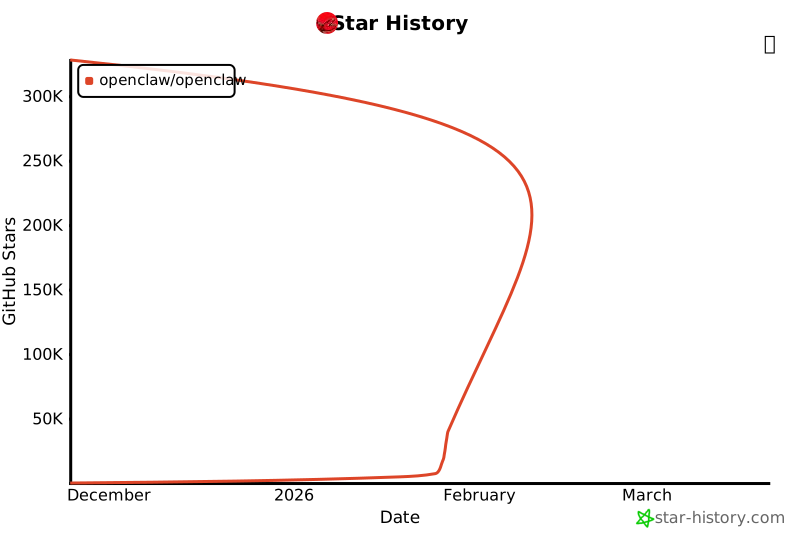
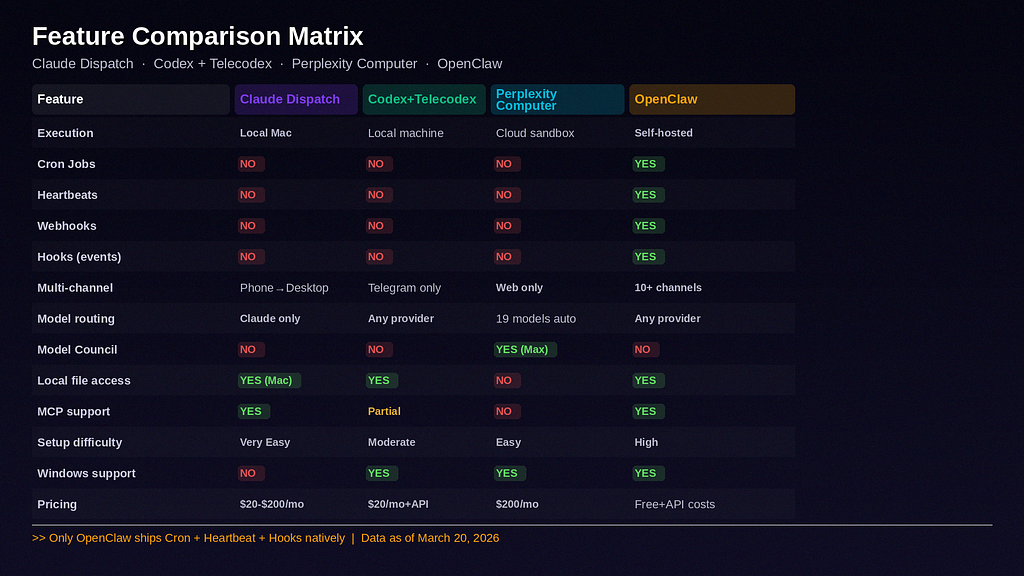
The framework introduced three primitives crons, heartbeats, and hooks , are genuinely still exclusive to OpenClaw. No competitor has all three natively. Not Dispatch. Not Perplexity. Not any official Codex tool.
OpenClaw’s Gateway architecture with its built-in cron scheduler, heartbeat system, and multi-channel delivery was built for the shift from reactive assistants to proactive workflow partners.
Crons are the calendar. Heartbeats are the proactive nudge that reaches out to you without being asked. Hooks are the if-this-then-that that fires when something happens inside the agent lifecycle.
Everything that came after — Dispatch, Perplexity Computer, is either competing with or building alongside the model OpenClaw established…. Keep that in mind as we go through each one.
1. Claude Dispatch
What Actually Happened on March 17
Building on the momentum of its “Cowork” agentic platform, Anthropic officially launched Claude Dispatch as a research preview. The new feature introduces a phone to desktop workflow, allowing users to initiate, monitor, and control complex AI tasks on their local computers from a mobile device…

The setup is intentionally simple. Download Claude Desktop, open Cowork, click Dispatch, scan a QR code. That’s it. Two minutes. Your Mac now has remote ears…
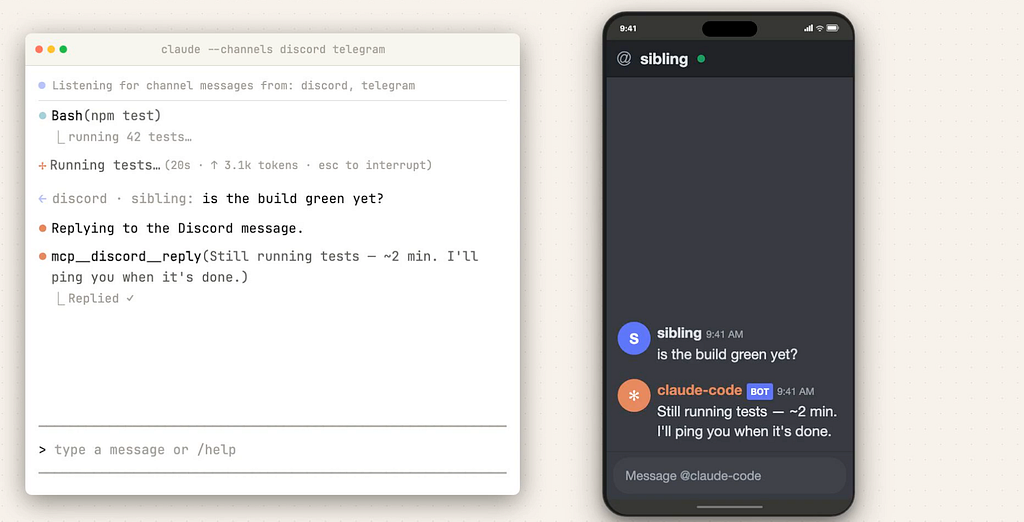
From there it can touch local files, connected plugins, MCP servers — everything already installed on your machine. Presentations, spreadsheets, folder organisation, reports… it handles them while you’re away. And crucially — your data never leaves your device. All processing is local.
The Architecture
The core design decision here is local-first. Your Mac does the work. Your files never leave your machine. The phone is just the remote control — a thin message layer, not the brain.
This is deliberately conservative compared to what OpenClaw or Perplexity does, and that conservatism is a feature, not a bug. For anyone with a serious codebase, sensitive files, or MCP servers configured locally, Dispatch’s architecture means your actual toolchain stays intact. You’re not rerouting your repo through a cloud sandbox.
Where It Falls Behind
The limitations are real and worth being honest about.
This feature is exclusively available for macOS. Windows users cannot use the desktop Cowork or Dispatch features, and there is no official release date for a Windows version yet. Your Mac must remain powered on, awake, and actively connected to the internet for the mobile app to send tasks successfully.
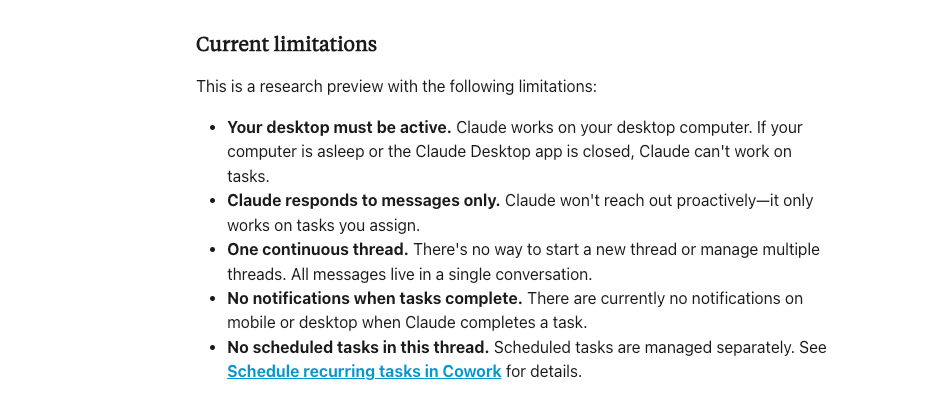
There’s also a meaningful constraint compared to OpenClaw: there are no crons, no heartbeats, no webhooks. Dispatch is reactive. You send a task, Claude does it. If you want your agent to run a daily briefing at 7am without you sending a message, Dispatch can’t do that today. OpenClaw has been doing it for months.
Pricing
- Claude Pro: $20/month — Dispatch access coming shortly after Max
- Claude Max (5x): $100/month — first to get Dispatch
- Claude Max (20x): $200/month
- API: Claude Sonnet 4.6 at $3/$15 per million tokens (input/output), Opus 4.6 at $5/$25
Who It’s For
Solo developers and professionals who already live in Claude’s ecosystem, want clean local execution with no cloud data risk, and primarily need to delegate tasks from their phone to a running desktop session. If you’re a knowledge worker with a Mac and a Claude Pro subscription, Dispatch is the easiest on-ramp to agentic workflows you’ll find in 2026.
2. Codex + Telecodex
OpenAI’s Codex CLI is an open-source terminal coding agent that authenticates with a ChatGPT account or API key and can point at custom model providers by changing base URLs, headers, and API wiring. It was built from the ground up to be composable. The official product already assumes a more flexible stack, which is exactly why the community built so much around it.
One thing to be completely clear about: there is no official OpenAI channel adapter for Codex. No official Telegram bridge. No official Discord integration. OpenAI hasn’t shipped this. What exists is a growing ecosystem of community tools cand the most interesting one is Telecodex.
What Telecodex Is
Telecodex is a Telegram-native bridge built by the community, not OpenAI. It long-polls Telegram, maps each chat or forum topic to a local Codex session, stores ACLs (access control lists) in SQLite, stages attachments under .telecodex, and streams outputs and artifacts back to Telegram. It deliberately avoids a central relay and mirrors Codex’s own runtime rather than inventing a separate agent scheduler.
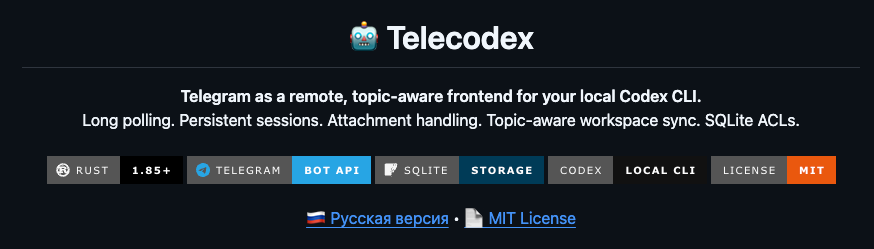
What makes this architecture elegant is how thin it is. Telecodex doesn’t pretend to be a cloud service. It’s a remote front-end for a local Codex process which means every Codex capability (custom providers, sandboxed execution, approval flows) is available through Telegram chats and forum topics.
Want to swap Claude out for Gemini or Llama? Change the base URL in Codex. Want to approve or deny individual shell commands before they execute? That’s a native Codex feature. Telecodex just gives you a Telegram UI to do it from anywhere.
What It’s Best At
- Provider flexibility: Codex already supports custom providers, so you’re not locked to OpenAI
- Chat-native control: Telegram forum topics as persistent coding workspaces with proper ACLs
- Attachment handling: send a file to Telegram, Telecodex stages it for the session
- Approval flows: accept or reject agent actions from your phone
- Community extensibility: if you want Discord or Slack instead, adjacent projects like OpenBridge and Ductor extend the pattern
For the Codex CLI on the pricing side: it’s included in ChatGPT Plus ($20/month), Pro ($200/month), and Business ($30/user/month). API pricing via GPT-5.3-Codex runs $1.75 input / $0.175 cached input / $14 output per million tokens.
Where It Falls Behind
The honest downside here is that this is a community-built stack. You inherit more setup, more edge cases, and zero product-level support. Telecodex is Telegram-first — if you want Discord or Slack, you’re stitching together separate community projects rather than using one official flow. And if OpenAI eventually ships an official channel integration, Telecodex might get displaced overnight.
There are also no scheduled tasks, no heartbeats, no proactive agent behavior. Telecodex runs when you message it. OpenClaw runs on a schedule whether you message it or not.
Who It’s For
Developers who want the most hackable, provider-flexible remote coding setup and are comfortable assembling a community stack. If Telegram is your primary interface, your repo is your main concern, and you want to swap models freely — this is the best option on the market.
3. Perplexity Computer
What It Is
Perplexity launched Computer on February 25, 2026 — a multi-model agent orchestration platform that coordinates 19 different AI models to complete complex, long-running workflows in the background. , it represents a fundamental bet: AI models are specializing, not commoditizing, and the value will accrue to the orchestration layer.
Perplexity Computer runs entirely in Perplexity’s cloud sandbox, manages its own connectors, and makes routing decisions across 19 models automatically.
Claude Opus 4.6 handles orchestration and coding. Gemini powers deep research. GPT-5.2 manages long-context recall. Grok handles lightweight, speed-sensitive tasks. The model roster isn’t fixed — Perplexity adds new models as they prove their strengths and rotates out underperformers.
The Model Council Upgrade
The latest major addition to Perplexity Computer is Model Council — and it’s genuinely interesting. Model Council automatically runs GPT-5.4, Claude Opus 4.6, and Gemini 3.1 Pro in parallel, then synthesizes where they agree, disagree, and what each uniquely contributes. You can choose your orchestrator model for full control over how results are combined.
When you’re making decisions that cost money or time, you want to know if the models are aligned or if they’re pulling in different directions. A developer building an architecture decision might see GPT-5.4 and Claude Opus suggesting different approaches, while Gemini points out a security angle nobody mentioned. Instead of copy-pasting the same prompt into three browser tabs, you get the synthesis in one place.
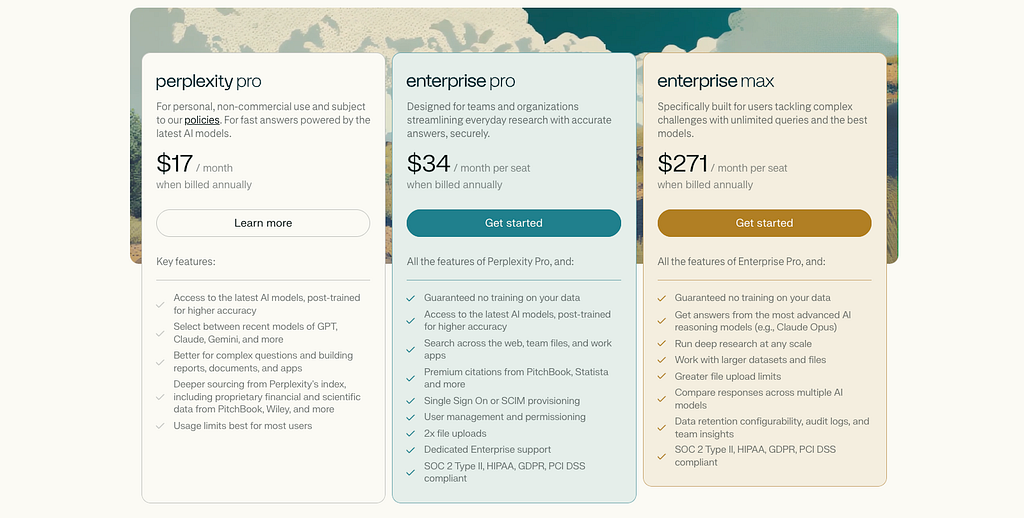
The Max plan also includes a GPT-5.3-Codex coding subagent, Skills for reusable workflows, Model Council with memory across sessions, and Voice Mode for hands-free interaction.
Where It Excels — And Where It Doesn’t
Perplexity Computer is built for knowledge work at scale: research, financial analysis, competitive intelligence, documentation, presentations, email workflows. Its strength is breadth and managed execution — you don’t need to operate any infrastructure, manage any API keys, or worry about what model to use for which task.
The weaknesses are equally clear. Tasks pause when credits are exhausted. At $200/month with 10,000 monthly credits, you’re paying for leverage but the credit consumption model means costs aren’t entirely predictable. You’re also inside Perplexity’s execution model entirely — there’s no local filesystem access, no direct connection to your dev tools, no MCP server support.
And the price point isn’t for everyone. $200/month is a significant commitment, especially when Claude Max is also $200/month and includes a more local-first execution model for those who prefer it.
No heartbeats, no crons. Perplexity Computer can schedule tasks and run asynchronously, but it doesn’t have the kind of always-on proactive agent loop that OpenClaw pioneered. It’s reactive to your requests, not proactive about your environment.
Pricing
- Perplexity Pro: $20/month — access to multiple frontier models, but no Computer
Who It’s For
Analysts, consultants, researchers, and operators who want a managed multi-model cloud worker for cross-app workflows and knowledge work. Not the right fit if your primary concern is local dev, deterministic coding pipelines, or budget predictability below $200/month.
4. OpenClaw
What It Actually Is
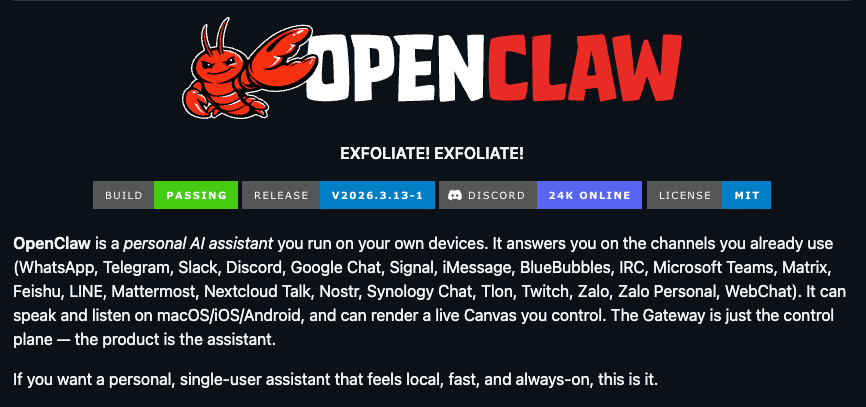
OpenClaw is best understood not as an AI coding tool or a remote control feature — it’s an agent operating system. You run the Gateway yourself (on a VPS, your home server, or your main machine), and it becomes a persistent control plane for an AI agent that lives across every channel and device simultaneously.
OpenClaw works on top of ChatGPT, Gemini, Llama, or whatever fits your stack. The real value is in the automation layer it adds around the model. Think of it this way: the LLM is the brain; OpenClaw is everything else — the nervous system, the calendar, the habit tracker.
The Three Primitives Nobody Else Has
This is where OpenClaw genuinely has no current competitors:
Cron Jobs — Cron is your agent’s calendar. It handles anything that needs to happen at a specific time or on a recurring schedule. You can create one-shot reminders, verify they exist, and run them immediately. Wakeups are first-class: a job can request “wake now” vs “next heartbeat”. Webhook posting is per job.
Heartbeats — Heartbeats are a special type of proactive message — your agent reaches out to you on a schedule without waiting for input. Unlike regular cron jobs that run a task silently, heartbeats always send a message to your chat. HEARTBEAT.md is one of the most underused files in OpenClaw. It defines what your agent should do when it’s idle — what to check on, what to be proactive about, how to be helpful without being asked. A well-configured HEARTBEAT.md turns your agent from reactive to proactive.
Hooks — Hooks are event-driven. An OpenClaw event fires, and a hook runs automatically in response. No user input needed. The mental model is dead simple: If X happens → do Y. New session starts → Pull in the user’s last three conversation summaries. Session resets → Spin up a clean project directory and pre-load relevant config files.
Every chatbot on the market — ChatGPT, Gemini, Perplexity — is reactive. OpenClaw’s Gateway architecture with its built-in cron scheduler, heartbeat system, and multi-channel delivery was built for the shift toward proactive agents that operate on a schedule, identify what needs attention, and surface it.
No other product in this comparison — not Claude Dispatch, not Perplexity Computer,— ships all three of these primitives natively. This is OpenClaw’s moat.
Multi-Channel for Real
OpenClaw runs behind Telegram, Discord, WhatsApp, Slack, Mattermost, email, web chat, webhooks, and more — all simultaneously, from one Gateway. The biggest practical upgrades include official Chrome DevTools attach mode for signed-in browser sessions, built-in browser profiles, and browser act batching that makes automation less janky.
Cron + hooks + webhooks now power most production agent stacks — a sign that reliable scheduling beats one-off automation scripts.
Where It Falls Behind
OpenClaw is the most powerful option in this comparison, but it’s also the most operationally demanding. You own the threat model, the reliability model, and the integration sprawl. There’s no managed cloud to absorb failures. If your Gateway goes down at 3am and a cron job fires, the task is missed.
Cost is also non-trivial and unpredictable. OpenClaw itself is free (MIT licensed), but you pay for every model provider API call. Running cron jobs, heartbeats, and proactive loops adds up across sessions. Truly strong local model setups generally require very high-end hardware, so most serious deployments pair OpenClaw with cloud APIs rather than running fully local frontier models.
The setup curve is real. Getting Telegram, webhooks, multi-agent routing, and crons all working reliably takes meaningful configuration time. This is not a product you QR-code pair in two minutes.
Pricing
OpenClaw is free and MIT licensed. Your costs are purely:
- Model provider API usage (the main ongoing cost)
- VPS or server hosting if you want always-on operation (~$5–20/month for a basic setup)
- Optionally: local hardware if you want to run models locally (requires very high-end GPU hardware for frontier-class performance)
Who It’s For
Technical operators — solo founders, indie developers, power users, small teams — who want maximum control over their agent infrastructure, are comfortable running a self-hosted gateway, and need proactive automation that rivals Zapier but with LLM reasoning at the center.
The Capabilities Comparison: Side-by-Side
Pricing Reality Check
Let’s be blunt about what things actually cost for real users:
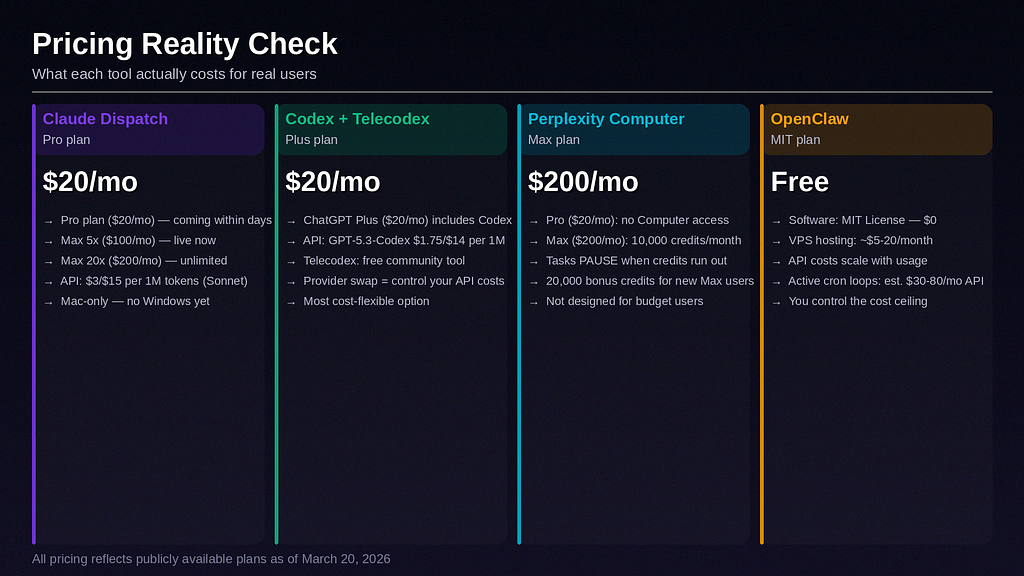
Claude Dispatch is accessible at $20/month on Pro — but you’re Mac-locked and in research preview with a ~50% early-bug success rate. At $100/month for Max, it’s the cleanest agentic experience in the Anthropic ecosystem.
Codex + Telecodex starts at $20/month for ChatGPT Plus and is the most cost-efficient option for developers who want Telegram-native remote coding with provider flexibility. API costs add up if you’re making a lot of calls, but the ceiling is controllable.
Perplexity Computer at $200/month is an enterprise-grade bet for knowledge workers who need the 19-model orchestration and Model Council features. It is not a casual upgrade — the credit consumption model means heavy usage can drain limits faster than expected. Not designed for students, side-project founders, or anyone running lean.
OpenClaw has no monthly software fee, which sounds ideal until you realize your API costs scale with how much you use it. A setup with multiple daily cron jobs, heartbeats, and active sessions running on Claude Opus or GPT-5.4 can realistically cost $30–80/month in API calls alone — but you control the ceiling completely, and you can run cheaper models for lightweight tasks.
Who Each Tool Is Actually For
Pick Claude Dispatch if…
Pick Codex + Telecodex if…
You’re a developer who lives in the terminal, wants Telegram as your coding control surface, and values the freedom to swap models whenever a better one ships. You’re comfortable assembling a community stack and don’t need a blessed, first-party product. You want local-first execution with approval flows for every shell command.
Pick Perplexity Computer if…
You’re an analyst, consultant, researcher, or operator who needs a managed AI worker that synthesizes web data, creates documents, routes across 19 frontier models, and runs complex cross-app workflows asynchronously. You can afford $200/month and you’re not trying to live inside a local terminal loop.
Pick OpenClaw if…
You want a self-hosted, always-on, proactive agent that doesn’t wait for you to speak first. You need scheduled tasks, heartbeat check-ins, event-driven hooks, and omnichannel delivery across every platform you use. You’re technical, you’re serious about automation, and you want the most powerful agent runtime available regardless of setup complexity.
My Honest Ranking
Best local-dev architecture: Claude Dispatch — clean, local-first, zero ops, growing fast.
Best hackable Telegram coding stack: Codex + Telecodex — maximum flexibility for developers who want full provider control.
Best managed cloud worker: Perplexity Computer — the only product on this list running 19 models with Model Council synthesis for serious knowledge work.
Best self-hosted proactive agent OS: OpenClaw — the only product with native crons, heartbeats, hooks, and true omnichannel agent runtime. Still the most powerful, still the most ops-intensive.
The Bigger Picture
What’s actually interesting about this moment isn’t any one product — it’s that the category is maturing in real time. OpenClaw proved persistent agents are possible. Claude Dispatch proved mainstream AI companies are taking remote agent control seriously. Perplexity Computer proved multi-model orchestration is a real product, not just a research concept. And Telecodex proved that wherever official products leave gaps, communities will fill them fast.
The war for your agent runtime isn’t over. It’s just getting started.
The question isn’t which one is best. The question is which architectural bet matches how you actually work — local or cloud, reactive or proactive, managed or self-hosted, coding-first or knowledge-work-first.
If you’re still not sure, start with what costs you nothing: spin up OpenClaw for a week and configure a heartbeat. The moment your agent sends you an unprompted morning briefing that you didn’t have to ask for, you’ll understand why this category exists.